ZettelFlow Home¶
Home is the place you land when Obsidian opens: a calm page that greets you, lets you write straight away, and shows where you left off and what came back today. It is one of three modes of the Home surface — Home, Cultivate and Think — and since epic #701 the three are one family: the same mode bar, the same composer, the same cards, serif for ideas, and every colour from your theme.
Opening it¶
Click Home in the ZettelFlow ribbon menu, or run Show home. With Open Home when Obsidian starts on (the default for new installs, in Settings → ZettelFlow), it is the first thing you see. It updates itself as the vault changes — there is no Refresh button.
What it shows, from the top¶
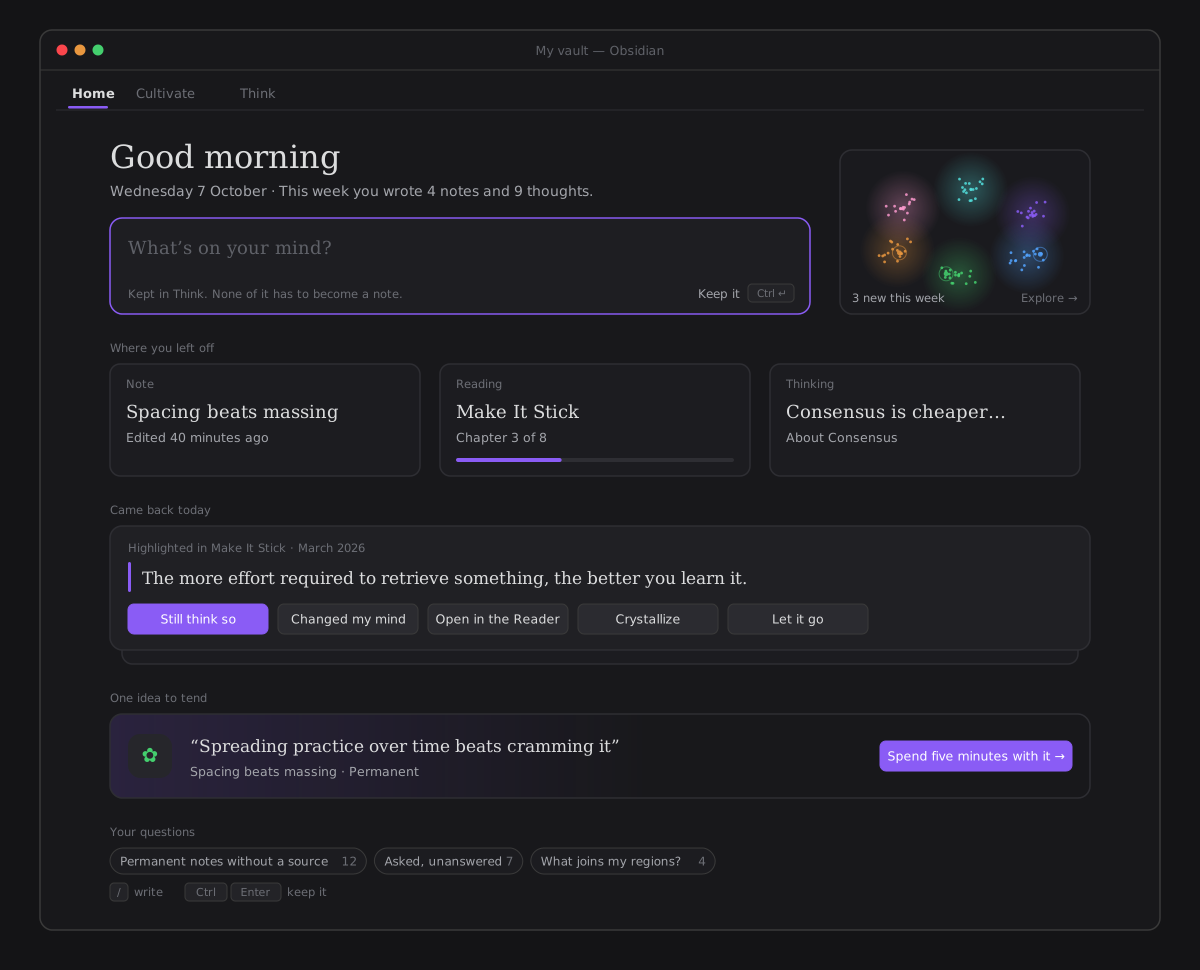
- A greeting for the moment of day — Good morning, Good afternoon, Good evening, Still up — the date, and one plain fact: This week you wrote 4 notes and 9 thoughts. A fact, never a counter of days and never a score (§XII).
- Think's composer, right there: What's on your mind? Ctrl/Cmd+Enter (or Keep it) keeps it in Think — a thought, never a note, and no dialog to open first. Nothing has to become a note.
- A glimpse of your vault — a small canvas drawn from the same data as the graph: your regions as soft nebulae in Explore's colours, the notes of this week pulsing. Click it to open Explore. It draws only while it is on screen and holds still under reduced motion.
- Where you left off — three cards: the last note you had open, the reading in progress (a note path, a saved reading or a PDF/EPUB from your Library, with how far you got) and the last thought you wrote in Think. Each opens where you were.
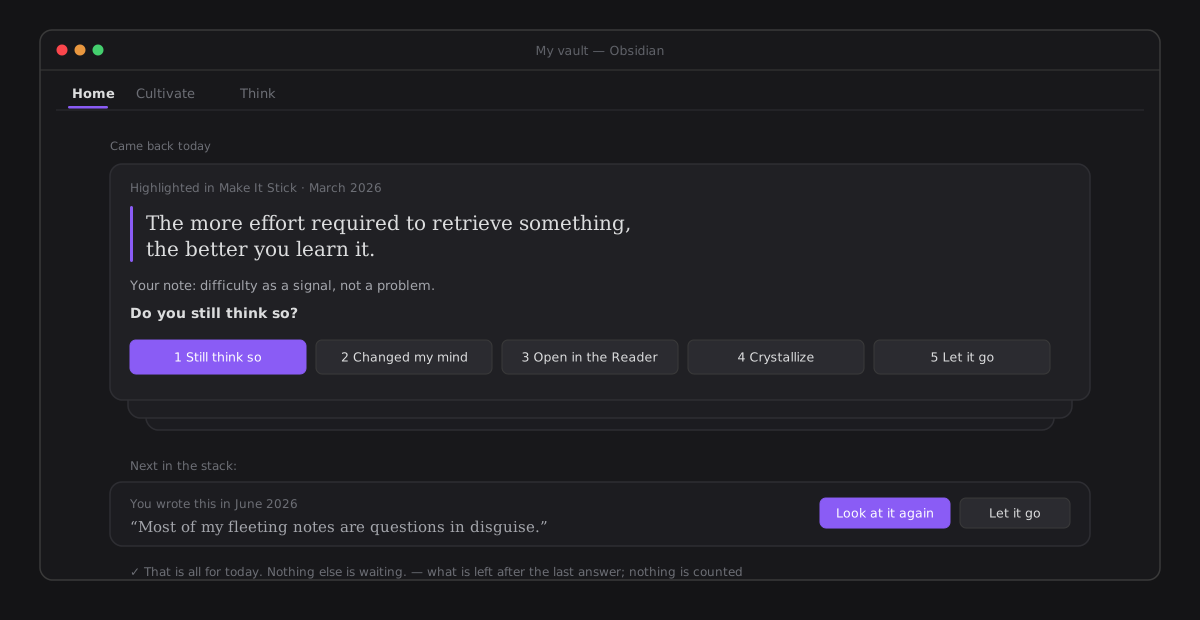
- Came back today — one quiet stack: what you marked in the Reader and is due a second look (highlights review), then one claim of yours or a wager whose day has come. The top card is answered in place; the next ones peek out from behind it; the last answer leaves That is all for today. Let it go lasts the day and records no judgement. On a day nothing came back, the section is not there at all.
- One idea to tend — a single invitation instead of a list: the idea Cultivate would offer first, quoting what it claims. Spend five minutes with it opens Cultivate on it.
- Your questions — the saved queries you pinned, each a chip with its live count that asks it again in Explore.
- An unfinished note — when a wizard was left mid-flow, one line offers to pick it back up.
On an empty vault, Home offers three ways in instead of an empty page: write a first note with a flow, read something you already have (the Library), or just think in the box above. While the index is being built, the greeting and the composer are already there.
One set, one camera (#875)¶
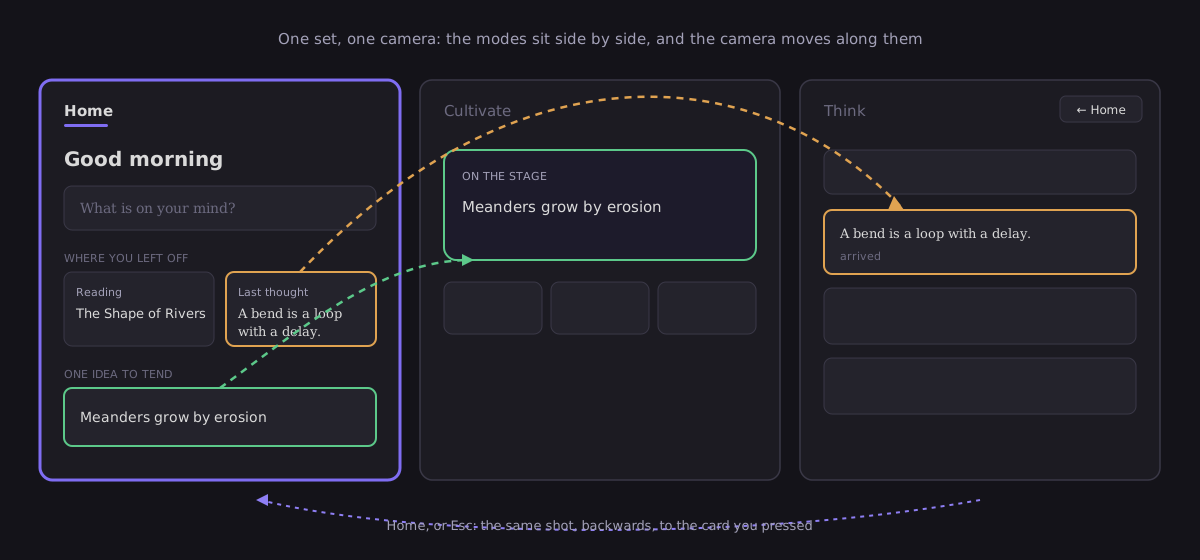
Home, Cultivate and Think are not three pages that replace each other: they sit side by side, in the order of the mode bar, and moving between them is the camera moving along that set (§XVI, never cut, move the camera).
- The mode bar pans. Choose Think from Home and the camera travels right, past Cultivate, the line under the tabs travelling with it. Nothing fades in: the place you chose arrives from the side it lives on.
- Two cards are doors that become their place, in one gesture with the pan:
- Last thought flies into its own entry in Think's list, which says it arrived.
- One idea to tend (Spend five minutes with it) flies onto Cultivate's stage.
- The way back is the same shot, reversed. After a door, Cultivate and Think show ← Home in their header, and Esc does the same — unless you are typing, a menu is open, or the mode is using Esc itself (Think, while it is taking a source away). The card flies back to where it came from, in a Home drawn afresh. Moving by the bar forgets the way back: it is never a history.
- Some things open in their own tab, as always. Last note opens the note, the glimpse and Your questions open Explore, and Reading keeps its own shot into the Reader. A link from elsewhere, or a restored workspace, lands on its mode with no shot at all.
- Never in the way. Any key or press during a shot jumps it to its end and does nothing else; under reduced motion every move is instant, and you are still in the same place.
Only one mode is built at rest. The one you go to is built — and has drawn what the card lands on — before the camera moves, and the one you left goes when the shot lands.
What left Home, and where it went (#703)¶
Home used to be a dashboard: a you've been thinking for N days counter, a what to do next list, three hero tiles, a 3D teaser and nine sections behind Show everything. Each kept its door somewhere better:
| Was on Home | Now |
|---|---|
| Thinking-days counter | Gone — a count of days is a score (§XII); the plain fact of the week replaced it |
| What to do next | One idea to tend |
| Asked, unanswered | Explore's suggested question Asked, unanswered |
| Gaps and their not related | Cultivate's Connect it move, beside Link — the verdict is recorded the same way |
| New ideas · main concepts · deserves a review | Explore's suggested questions and Health › Tend |
| 3D-graph teaser | The vault glimpse |
| Saved readings | Where you left off (the reading in progress) and the Reader's chooser |
| Quick capture (a dialog) | The composer, on the page |
| Refresh | Home updates itself |
Principles¶
- Read-only, except what you write. The composer writes a thought to Think; answering what came back writes what the review and the return always wrote. Home itself writes nothing to your notes.
- Never keeps score. No streaks, no counts of days, no "you are behind" (§XII).
- Offline, AI never involved. Everything on Home is read from your vault and the plugin's data.
Architecture¶
HomeModeRenderer composes the page from the State barrel (dueClaims, selectCultivationTarget, runGraphQuery, build3DGraph) and Think's store (ThoughtStore.countSince, latest, dueHighlights). The shared shapes live in architecture/components/core/family/ (the page, the eyebrow, the keyboard hints and the composer); the stack is CameBackStack over the pure cameBackOrder; the glimpse is HomeGlimpse over the pure glimpseOf/drawGlimpse, gated by a performance budget (view.home.glimpse.frame.10k, under 2 ms a frame). The set (#875) is the surface host's — ModeHostView.travel() over the pure modeSet and the shared CameraPan — see A surface as a set.