Dictionaries for look up
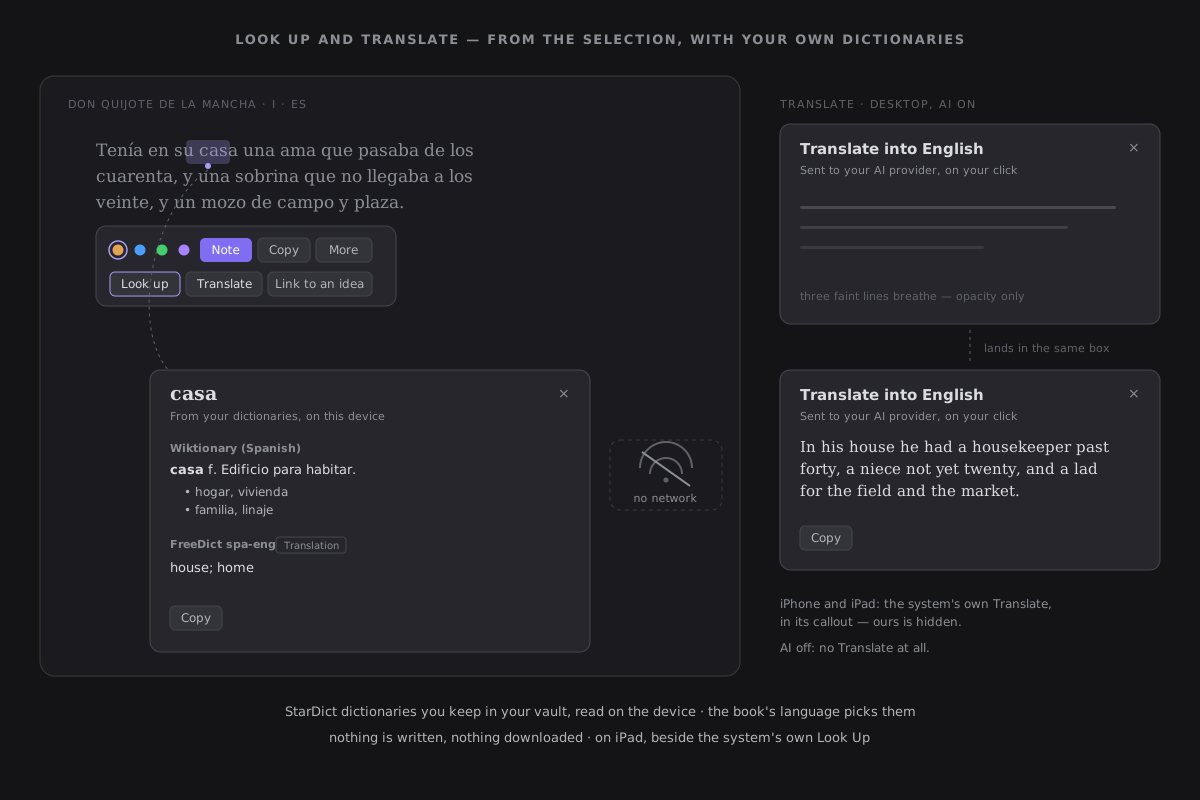
Select one to three words in the Reader and press Look up, first in the popover's second row: the meaning — or, with a bilingual dictionary, the translation — appears beside the word, from dictionaries you keep in your vault. Nothing is fetched, nothing is bundled, nothing is written: the dictionaries are files you put there, read on this device.
StarDict
StarDict is an open dictionary format, read by KOReader, GoldenDict and many other readers, with free dictionaries for many languages and language pairs. A dictionary is a few files that share a name:
| File | What it is | Needed |
|---|---|---|
name.ifo | a small text file: the dictionary's name, its size, its entry types | yes |
name.idx or name.idx.gz | the index of headwords — FreeDict ships it gzipped | yes |
name.dict.dz or name.dict | the entries — .dict.dz is compressed (dictzip) | yes |
name.syn | synonyms: in many builds, the inflected forms of each word | no, but it helps |
Prefer .dict.dz when a dictionary offers both: it is smaller to sync and to hold, and only the part an entry needs is decompressed.
Install one
- Create a folder called
Dictionariesat the root of your vault — or choose another in Settings → Reading › Dictionaries folder. ZettelFlow never creates it. - Download a StarDict dictionary (see below) and unpack it.
- Put its files in that folder, loose or in a folder of their own:
Dictionaries/
├── wiktionary-es.ifo
├── wiktionary-es.idx
├── wiktionary-es.dict.dz
├── wiktionary-es.syn
└── freedict-spa-eng/
    ├── spa-eng.ifo
    ├── spa-eng.idx
    └── spa-eng.dict.dz
Settings → Reading lists each dictionary it found under the folder row, by its own name and with its languages. One that is incomplete says why — Missing its .idx — and is not used.
Which dictionary answers
The dictionaries used are those whose language is the book's: an EPUB's or a PDF's declared language, else Obsidian's. Their answers come one after another, each under the dictionary's name:
- Monolingual dictionaries (Spanish → Spanish): the meaning.
- Bilingual ones into Obsidian's language (Spanish → English): the word's translation, offline — what Kindle calls a translation dictionary.
- Any other bilingual one.
The word is matched ignoring case, then against the dictionary's synonyms — so corrió finds correr when the dictionary carries its inflected forms. Nothing else is guessed: no stemming, no fuzzy match, no accent folding.
A dictionary that declares no languages
Many StarDict builds do not say which languages they are in. A dictionary that ends its name with its pair — FreeDict and the Wiktionary builds do: Spanish-English FreeDict Dictionary (es-en) — is read by it. For the others, Settings → Reading shows two small fields beside the dictionary — From and To — to set once, as language tags (es, en, pt-BR); leave To empty for a monolingual one. They are kept in the plugin's settings, never written into the dictionary.
On iPad
The Reader's Look up sits in its own popover, and the system's Look Up stays in its callout, beside it: the system's reaches Apple's dictionaries, ours reaches yours. Once the Dictionaries folder has synced, look up works in airplane mode exactly as on desktop.
A whole dictionary is held in memory while you read, so an iPad has a limit: a dictionary larger than it can open says This dictionary is too large to open on this device, and the others still answer. A .dict.dz is what keeps a large dictionary under it.
Where to find free dictionaries
ZettelFlow bundles none and downloads none. These projects publish free StarDict dictionaries; check each dictionary's own licence:
- FreeDict — bilingual dictionaries for many language pairs; choose the StarDict download.
- Wiktionary dictionaries — monolingual and bilingual dictionaries built from Wiktionary, with inflected forms, in StarDict format among others.
- KOReader's list of dictionary sources — more sources of StarDict dictionaries, maintained by the KOReader community.
Privacy
Look up makes no network request of any kind, with AI on or off, online or offline. The dictionary files are read through the vault, on the first look-up that needs them, and kept for the session; nothing is ever written to them or to the folder. Copy on the card is the only thing it does beyond showing — see Capabilities & privacy.
Translating a passage is different: see Look up and translate.