The graph¶
Epic #692 — ask, and the graph answers. It replaces the 3D view of #280, which #484 had folded into Explore as a lens. If you knew it as the 3D knowledge graph or as The graph lens, this is where it went.
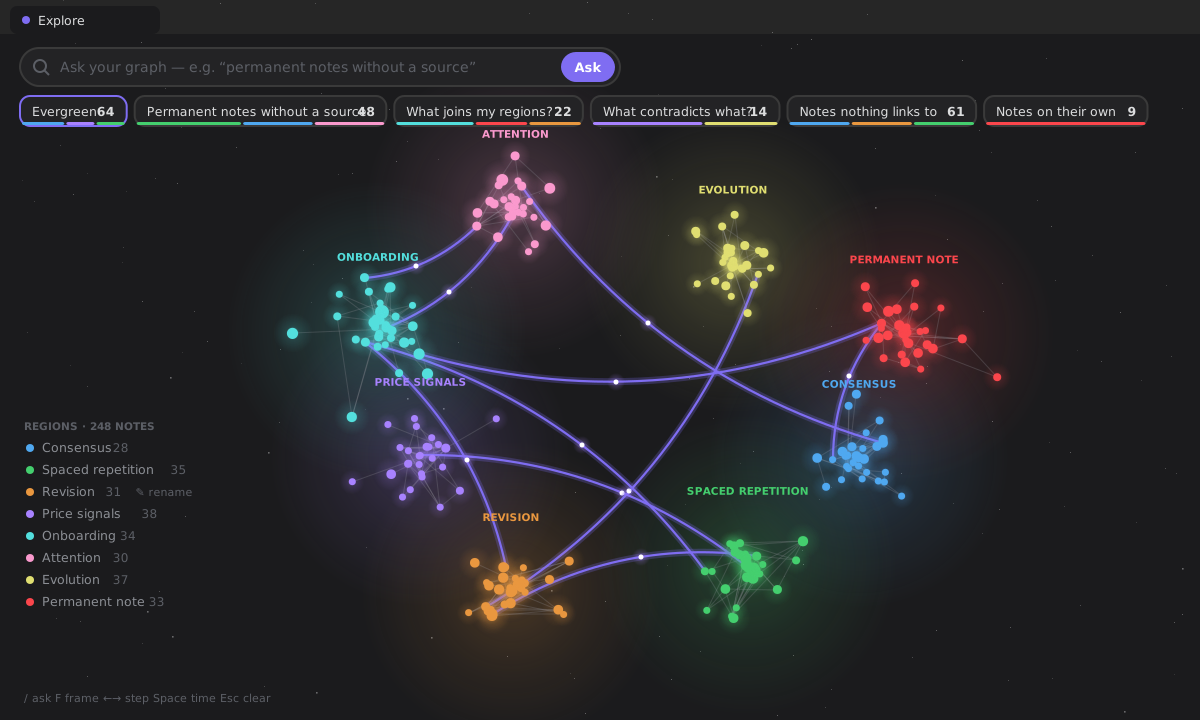
The graph is Explore: your whole vault drawn as a field of notes in their regions, with a question bar on top. Ask, and the graph answers — the matching notes glow, the rest of your vault dims, the camera frames them. This page is about the graph itself: what it draws, how, and what it costs.
Everything here is read-only and offline — a click focuses a note, a double click opens it, and the graph never writes. The one thing it keeps is the name you give a region, in plugin data.
What it draws¶
- Notes are dots, sized by how connected they are. Colour has two modes, in the ⋯ menu: by region (default) — the neighbourhood the note lives in — and by maturity — its lifecycle state on the theme's own colours.
- Regions are nebulae. A region is a community the graph finds in your links (Louvain, #522), drawn as soft weather around its notes and named after its best connected note — until you rename it. Seen from afar, the names float over the regions; closer in, the notes' own names take over.
- Links are coloured by relation type (supports, contradicts, expands…). A link that crosses from one region into another — a bridge — is drawn dashed; ask what joins my regions? and the bridges glow with light travelling along them.
- Labels go on the best connected notes, on the answer's notes when you ask, and on whatever you point at — placed so they never cover each other.
- The sky is your theme's background. Light theme, light sky; dark theme, dark sky with a few stars. Every colour is read from your theme (§XV), and changes when you change it.
How it is drawn (#693)¶
The old view drew one mesh per note and a cylinder and a cone per link through 3d-force-graph and three — about nine thousand draw calls at two thousand notes, and 1 MB of the plugin (31 %). The engine that replaced it is ZettelFlow's own, on WebGL2:
- Five draw calls a frame, whatever the size of your vault: nebulae, stars, links, halos, notes. Every note is one instance of the same quad, every link one instance of the same strip.
- It draws only when something moves — a camera flight, the layout settling, a fade, light along a bridge. Idle, it costs nothing; behind another tab, it does not even ask for frames.
- Colours live in typed buffers. A hover rewrites numbers in place; the GPU re-reads them only when they changed. Labels and rings are on one 2D overlay, never a texture per note.
- No WebGL2? The same picture on a 2D canvas, drawn by the CPU. No canvas at all? Explore opens its answer card on every note — still a way in, never a blank view.
main.js went from 3,251 KB to 2,273 KB.
The layout (#694)¶
Notes are placed by a force layout — links pull, notes push apart, each region holds together — written on typed arrays with a Barnes–Hut octree, and run in a Web Worker so the view never stalls while it settles. (When a worker cannot start, it runs in 6 ms slices of the main thread instead.) Every region starts on its own spot, so the layout spends its time settling rather than untangling.
It is remembered for the session: reopen Explore on an unchanged vault and the notes are exactly where they were, with nothing to lay out; change a note and only the difference settles.
| Measured (test/perf) | Before | Now |
|---|---|---|
| one layout tick, 2,000 notes | 16.8 ms on the main thread | 4.6 ms, in a worker |
| one layout tick, 10,000 notes | 131 ms on the main thread | 32 ms, in a worker |
| settle 2,000 notes from scratch | 5–9 s of main-thread frames | ~1.3 s, off the main thread |
| a hover at 10,000 notes | re-digests every object | 2 ms of buffer writes |
| draw calls | ~n + 2 · links | 5 |
The frame rate itself needs a screen and is walked by hand; everything above is a budget in npm run test:perf that fails the build when it is exceeded.
Moving around¶
- Drag to orbit (3D) or pan (flat); Shift-drag pans in 3D; wheel or pinch to zoom.
- Click a note to focus it and its neighbours and open its peek card; double-click to open it; right-click for open, open in a new tab, focus.
- The ⋯ menu: colour by region or maturity · 3D or flat view · more or fewer labels · fit everything · take a tour (a flight through the hubs and the newest notes) · export image.
- Keys, time and the peek card are on the Explore page.
Share your universe (export)¶
Export image frames the whole graph and captures it — graph and labels — as a PNG, then opens a preview with a file name; Save to vault writes it through the vault facade, never the Adapter API. Nothing is written until you confirm.
What went, and where it is now¶
| The 3D view had | Now |
|---|---|
| seven lenses behind a gear (orphans, dead ends, contradictions, alone, frontier, bridges, gaps) | questions to try, and terms you can save: orphan, leaf, contradiction, alone, bridge, region: (the gap lens lives in Home and This note, where a gap is answered) |
| its own search box | the one ask bar |
| a legend of neighbourhoods and seams | the regions as the legend, which also ask |
| path mode, spread, lite, fullscreen | the layout needs no spread; the graph is light by construction; the tab is the window |
| time-lapse with a slider | the time strip, with a sparkline of your months and notes arriving with a ring |
| a clip export (WebM) | an image export; a clip may return when someone asks for it |
Why three.js went (a settled decision, reversed)¶
This page used to say three.js stays: a dependency that drew the scene well enough, and writing a renderer was not worth it. Two measurements reversed it: three and its graph wrapper were 31 % of the plugin for one view, and the layout through them took a whole frame per tick on the main thread at two thousand notes. A graph of dots and lines needs instancing, a worker and the theme's colours — not a scene graph — and the engine that does exactly that is smaller than one of the libraries it replaced.
Where it lives¶
architecture/components/core/graph/
  graphScene.ts      the graph as typed columns (positions, communities, edges, adjacency)
  layoutCore.ts      the force layout (Barnes–Hut, seeded by community) — pure, runs in the worker
  layout.worker.ts   the worker, bundled inline by esbuild and started from a Blob
  layoutRunner.ts    worker or main-thread slices; layoutCache.ts remembers layouts per session
  graphCamera.ts     one projection for the GPU and the pointer
  graphTheme.ts      every colour from the theme
  graphPaint.ts      colours, sizes and glows into buffers
  glBackend.ts       WebGL2: five draw calls · canvasBackend.ts: the 2D fallback
  graphLabels.ts     labels and region names on one overlay · graphPick.ts: what is under the pointer
  GraphCanvas.ts     the host: loop, camera, pointer, overlay
askGraph/AskGraphRenderer.ts — Explore, which owns the graph
The data comes from the Knowledge State surface (build3DGraph), offline and read-only.