Cultivate — purposeful work and thinking sessions¶
Start with your own material¶
Open Home → Start with my material (or Resume my inquiry). Choose an existing note with the literal title/path picker, or capture one real idea. No Canvas setup, system installation or bulk tagging is required. Only one inquiry is retained; ordinary Cultivate remains available separately.
- Choose a starting note and state your question if useful. Add other notes explicitly.
- Keep selected-only scope or deliberately include one recorded-link hop. Inspect directed relations and recorded evidence. Opening a note does not mark it consulted; I used this material is your explicit attestation and determines the references in an outcome.
- Write your provisional response and uncertainty. Confidence is optional. Continuing, insufficient evidence, or stopping are valid dispositions. Sufficient for now is a separate reversible decision; adding support never supplies it.
- Save progress or Save and pause acknowledges a local checkpoint. Save response snapshot creates Markdown, not an overwrite. Retry pending work after an error; inspect the pending snapshot before abandoning an ambiguous operation.
- Cultivate without a purpose keeps the original moves, recipe and friction settings. Switching modes retains the in-memory inquiry; save it successfully for restart continuity.
Editors remain mounted during metadata/context refresh. Loading and errors are distinct from an empty scoped result. Actual device walkthroughs and the consented adoption pilot remain pending; automated tests are not evidence of user adoption or improved understanding.
Recovery guarantees¶
| Stage | What is durable | Recovery |
|---|---|---|
| Pending intent save failed | Earlier checkpoint only | Keep draft and retry; no file creation has started |
| Intent acknowledged, creation failed/conflicted | Frozen operation, destination and content | Retry the same operation; never overwrite a different file |
| File exists, receipt save failed | Pending operation and the file | A partial state, not success; restart/retry recognizes the exact same file |
| Receipt acknowledged | Checkpoint plus outcome receipt | Re-saving an unchanged revision does not create a duplicate |
Observed unambiguous renames follow the exact file. Missing/offline renames are not guessed from a basename; explicitly choose replacement context. Observed deletion remains unavailable even if a new file occupies that path. Newly excluded references cannot be read on retry. Abandoning an ambiguous operation requires confirmation and removes only its bookkeeping, never a potentially created note. This is local recovery, not distributed locking across devices or an atomic transaction with sync.
Create-only outcomes¶
Outcome snapshots use a create-only Vault boundary. An exact complete-content retry is recognized; different or externally modified content is a conflict and is never overwritten. Outcome folders must already exist, and unsafe/traversal/config paths are rejected. A snapshot is ordinary editable Markdown, not a live back-sync into the inquiry. New edits require a deliberately new snapshot, not an automatic append, replacement, filename suffix loop or extra file on retry.
Local checkpoint contract¶
The runtime keeps the editable draft outside settings until Save or Pause requests a checkpoint. All plugin-data writes use one serial queue, including journal/settings writes. Only the acknowledged revision is durable; newer input remains dirty, and a failure leaves it editable. One inquiry persists across restart independently of the bounded judgement log or whether logging is on. Unsupported/corrupt storage requires explicit reset. Clearing bookkeeping never deletes outcome notes. Unloading is not an acknowledgement: save successfully before closing to guarantee restart continuity.
Context bounds¶
The internal inquiry projection starts with selected notes only. Optional one-hop scope adds direct recorded neighbors of those seeds, never recursive expansion. Purpose prose is not a semantic search. Each candidate names its actual directed relation. Opening material is not an attestation that it was consulted, understood, or accepted.
One gather inspects at most 1,000 adjacency/relation/claim/source records, 200 material notes, 50 candidates and 100 combined relation/evidence rows. Truncation is explicitly reported; the bounded sample follows index encounter order, not an exhaustive global ranking. Missing/excluded endpoints and linked sources are not presented as evidence. Indexed context may omit inline enrichment, especially on mobile. No result means none found in this scope by this method, not universal absence.
State and provenance¶
One inquiry is independent of the activity log. Its optional purpose, selected notes, consulted notes, authored response and unresolved gaps have their own versioned local state. Only an explicit human decision marks a response sufficient for now; changing the question reopens it without deleting the previous response or decision context. Support edges and scores never settle it.
Markdown outcomes retain authored or explicitly accepted/modified provenance, consulted references only, and honest uncertainty. No confidence is invented. Draft limits are 4,000 purpose characters, 64,000 response characters, 32,000 gap characters, 20 selected and 200 consulted notes. Invalid or unsupported stored data is reported, not silently discarded; over-limit text is not truncated.
Ordinary thinking sessions¶
ZettelFlow is an engine that makes knowledge evolve. Cultivate is that engine made a daily practice: a short, guided thinking session that takes one idea and makes it measurably more connected and mature (#309).
Where the canvas wizard and quick-capture serve creation, and the dashboards serve diagnosis, Cultivate serves the middle of the lifecycle — DEVELOP → REVIEW → CONSOLIDATE — that used to be passive. It doesn't just tell you what to do; it walks you through doing it.
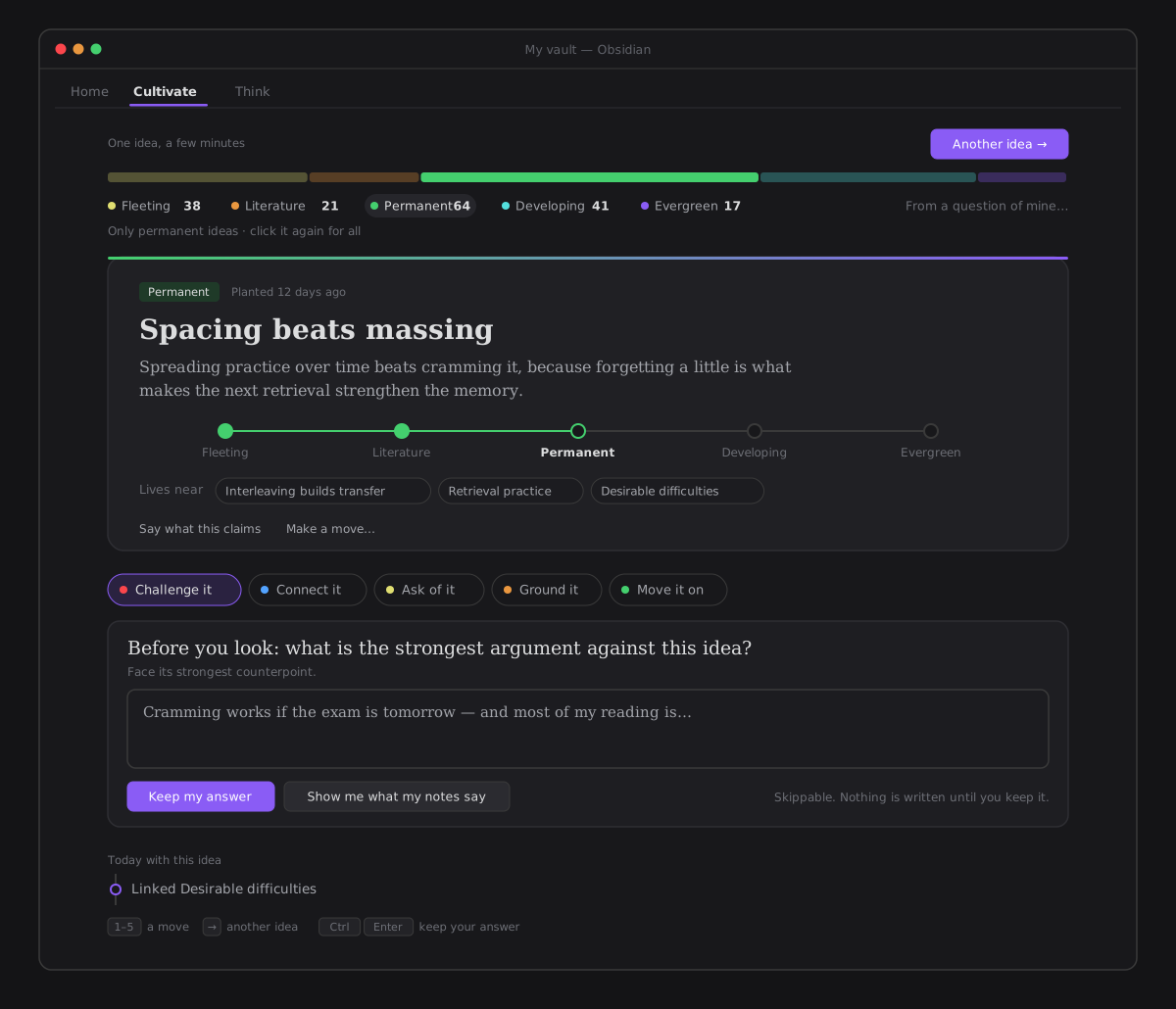
One conversation with one idea (#706, epic #701). Cultivate used to read like a form of metrics — a stage chart with emoji, a degree and a maturity number, a streak, and five moves as five cards at once. It reads like Think now:
- The idea is the hero. Its name, what it claims in the serif of an idea (you read the claim, not a row of numbers), where it is on its way as a gentle stepper — fleeting → literature → permanent → developing → evergreen — and the notes it lives near. The state chip is the door for changing the state; Say what this claims and Make a move… sit quietly at its foot.
- One move at a time, as pills in your words — Challenge it · Connect it · Ask of it · Ground it · Move it on (keys 1–5). The move you pick asks its question first, in Think's voice, and you write before you see what your notes say (ask before revealing).
- Today with this idea — a trail of what you kept: the counterpoint you wrote, the note you linked, the pair you said is not related, the stage you moved it to. Another idea starts a fresh trail.
- Another idea (→) is the one primary — moving on is what a visit is made of.
Starting a session¶
- Home surface → Cultivate mode, the
Cultivate — start a thinking sessioncommand, the ribbon menu (🌱), or Home's One idea to tend (Spend five minutes with it), which opens Cultivate on that idea. - ZettelFlow reviews your most embryonic ideas first (#589): the target is ordered by lifecycle stage —
fleeting → literature → permanent → developing → evergreen → archived— and within a stage by how connected the note is, deterministically. You develop the rawest ideas first, so the review feels intentional rather than arbitrary. Another idea moves on to the next one in order.
Notes by stage: the filter, and how your vault is maturing (#589, #706)¶
Under the header sits one strip: your notes by lifecycle stage as a single bar, each stage's share as wide as its count, in your theme's colours, with the stage names and counts beneath. It is a quiet picture of how the vault is maturing — and it is the filter. Click a stage (the bar or its name) and Cultivate offers ideas from it, the stage glowing and the others dimmed; click it again and every stage comes back, youngest first. Counts are facts, never a score: no percentages, no "healthy".
From a question of mine…, at the end of the strip, starts purpose-led work — the inquiry that used to be this mode's primary button.
The choice is remembered between sittings — it is a setting, cultivateStage, that ships with the control (you never hand-edit YAML for it), defaulting to any stage. When a chosen stage has no notes left, the strip stays on screen with a quiet "No notes at this stage yet." — never an empty surface you cannot get out of.
Peek at a note without leaving (#594)¶
Every note name in Cultivate — the target and the connect/challenge candidates — supports Obsidian's native Page preview: hold Ctrl/Cmd and hover to see the note in a popover without opening it. Clicking still opens the note as before — the preview is an addition, not a replacement.
This started in Cultivate and is now the rule everywhere a note name is clickable — Home, Ask-your-graph, Reasoning paths, Practice, Health, Resurface, the Evidence map and the Evolution timeline. See Mobile & accessibility → what the code guarantees for the shared helper and the guardrail that keeps a new surface from forgetting it.
The moves¶
Each move is a real, one-click operation on the target note — nothing is invented:
| Move | What it does | Reuses |
|---|---|---|
| Connect it | link an unlinked note that shares this one's context | find-related (#154) |
| Challenge it | show its contradictions, or capture your own counterpoint | find-contradiction (#153) |
| Question | capture an open question it raises (a question:: field) | inline fields (#153) |
| Advance | move it to the next lifecycle state (validated transition) | state machine (#158) |
| Ground it | ground it in a reference (source frontmatter) | sources (#155) |
The session refines as you act: after you link a note the connect list shrinks; after you advance the state the next one is proposed. The header shows the idea's degree and maturity — the before/after is a consequence of the moves, never an invented score. Advancing a state (or adding a source/connection) also records a development event for the thinking heatmap.
Two redraws, and never one guard for both (#580)¶
It said refines live for a year and did not. The card only listened to the vault-wide metadataCache resolved event, which a frontmatter-only write may never fire — so you could advance a note to literature and the button would still offer to advance it to literature. All five moves were affected; advance is simply the one whose result changes the whole card.
There are now two named redraws, the distinction the thinking space already paid for once:
| because you did something | always happens, never refused. It re-reads the note before re-deriving the session, because the write, the index update and the redraw are three steps across two event loops and Obsidian does not promise their order. |
| because something changed while you write | the note edited in another pane, or its state changed from the command palette. Refuses while a text box in this pane has focus, so typing cannot move the ground under you. |
And the state says what it became: the chip carries the state, pulses once when it changes, and a line beneath it reads was fleeting, now literature. An emoji can only say where a note is; a promotion is a fact about two states.
What it deliberately is not: there is no celebration, no level, no progress bar toward permanent and no count of notes per state — a locale scan over every cultivate_ and lifecycle_state_ string holds that line in both languages. The lifecycle is a cycle, not a ladder: evergreen goes back to developing for rework and archived revives to fleeting, so there is no final state and the advance control never runs out of something to offer.
Ask before revealing¶
#338, epic #335. On by default; one toggle in Settings → Thinking (Ask before revealing, in the Pauses card) turns it off.
Three of the five moves used to hand you their answer first — connect listed related notes, challenge listed contradictions, source announced the gap. A session could organise an idea without ever transforming it. So those three now ask a question before they reveal anything:
| Move | It asks | Recorded when you answer |
|---|---|---|
| Connect it | What do you expect this idea to be related to? | confirmed |
| Challenge it | What is the strongest argument against this idea? | challenged |
| Ground it | What evidence would you expect to find if this were true? | confirmed |
Question and advance deliberately get none: a question already is your own thought, and advancing a lifecycle state is a decision you are already making. Friction goes only where the system would otherwise answer for you — that is what makes it deliberate rather than a confirmation dialog.
Keep my answer (or Ctrl/Cmd+Enter) needs something written — that is the commitment — and records the answer in the judgement record. Show me what my notes say reveals the move and records nothing: a skip is not a judgement, and you can always skip. The optional how sure are you? dropdown left with #706 — the answer is the commitment.
Not related sits beside Link on every connection Connect suggests (#703): one click records that the two notes are not related — the same verdict the gaps on Home used to carry (#534) — writes nothing to the vault, and the pair is not suggested again.
Nothing here writes to your note. On challenge, what you wrote pre-fills the existing counterpoint field so your thinking is not thrown away and you can still save it with one click; on the other two it stays ephemeral rather than adding note noise. A different idea is a different session, so the prompts come back.
No streak, no metrics (#706)¶
The session header used to show a streak (days you exercised judgement) and the size of the cultivation queue, and the idea card a degree and a maturity number. All of it left with #706: a count of days is a score, and a number on the idea is a grade (§XII, cognitive agency). What you did today is in the trail, in words.
Principles¶
- Offline-first. Every move is graph-derived. The optional AI actions (challenge-idea, synthesize) are never required — Cultivate works fully without them.
- Layering. The session is a pure projection (
buildCultivationSession, re-exported from the Knowledge State surface); the writes live in a Workflow-EngineCultivationService, so the Experience view only reads state (the #266 guard).
Architecture¶
architecture/knowledge/cultivate/cultivationSession.ts   (pure: session + target + readyToCultivate)
  → re-exported via architecture/knowledge/state
architecture/plugin/services/CultivationService.ts        (the writes: link / question / counterpoint / source / advance)
architecture/components/core/cultivate/CultivateModeRenderer.ts  (the Cultivate mode on the Home surface)
README vocabulary for this page: Cultivate (thinking sessions).