Canvas integration & robustness
ZettelFlow turns Obsidian's native Canvas into a workflow surface by monkey-patching a few internal Canvas APIs (src/architecture/plugin/canvas/extensions/CanvasPatcher.ts via monkey-around). Obsidian does not expose these as a public API, so they can change between app versions. The integration is built to degrade gracefully rather than break the canvas (#304).
What is patched
| Patch | Target | Purpose | If the internal changed |
|---|---|---|---|
popup-menu | canvas.menu.render | fire the canvas:popup-menu event + re-center | skipped; menu still works |
view-data | CanvasView.getViewData / setViewData | stable serialization + JSON repair + fire injection/render events | skipped; canvas save/load still works |
| (events) | — | the zettelflow-* events the extensions listen to | best-effort; a throw never corrupts a save |
How it degrades (never a hard break)
- Patch-time (missing method).
PatchHelper.patchchecks that every method it means to override exists; if one is gone it returnsnullinstead of throwing, and the caller marks that patch degraded (CanvasPatchStatus). - Run-time (a patched body throws). Each patched body runs inside Obsidian's own loops, so its ZettelFlow additions are wrapped: on a throw it logs, marks the patch degraded, and falls back to the original method. The canvas keeps working without our enhancement.
- Report once. The first degrade shows a single Notice ("canvas integration partially unavailable after an Obsidian update") — never a stack trace, never repeated spam.
- Self-check. On load, a one-line summary is logged, e.g.
canvas patches: 2 attached, 0 degraded.
The status tracker (CanvasPatchStatus) is pure and unit-tested; PatchHelper's fail-soft path is tested too.
What ZettelFlow draws on the canvas (#686)
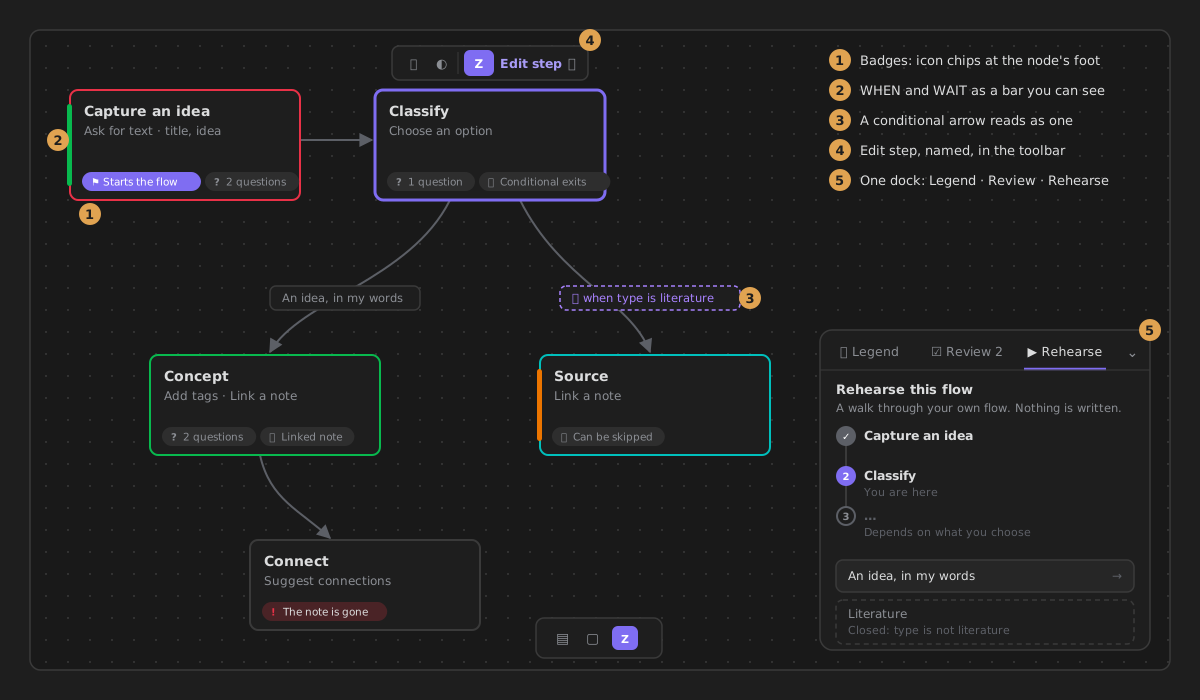
Everything below is ours: our own classes and children, added inside elements Obsidian gives us and removed before every redraw and on unload. The patches above are untouched by it.
| What | Where it lives | Notes |
|---|---|---|
| Badges — icon chips along a node's foot: Starts the flow, 2 questions, Template, Linked note, Can be skipped, Conditional exits, The note is gone | a strip appended to nodeEl | pointer-events: none; derived from the step's settings, nothing stored |
| Accents — WHEN a green bar, WAIT an orange bar, on the node's left side | a child of nodeEl, after Obsidian's container | the old inset shadow sat under .canvas-node-container (absolute, full size, its own background) and never showed |
| IF — a conditional arrow's label: dashed purple, with a filter icon | a class and an icon on the label's wrapper | the icon takes no pointer events, so editing the label is unchanged |
| Edit step · Copy flow · Edit this exit | the selection toolbar, as clickable-icon buttons | stable ids, removed before re-adding; Edit step shows its name |
| One dock: Legend · Review · Rehearse | one element on canvas.wrapperEl, bottom right | clear of the card menu and the canvas controls; the container takes no pointer events, only its tabs and panels; it folds to a row of tabs |
| An empty canvas — Create the first step and Browse systems | one card on canvas.wrapperEl | only its buttons take pointer events; the step it creates starts the flow (#793) |
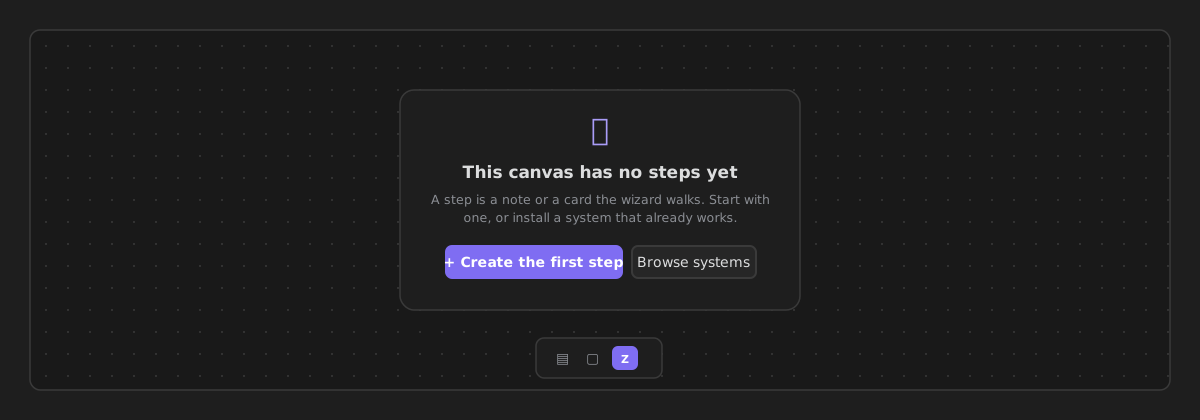
All of this appears only on a canvas that has a role. A canvas without one is left exactly as Obsidian draws it, and its file menu (right-click it in the file explorer, or its tab's ⋯) offers Use this canvas to create notes — the role dialog, then the step tools on the open canvas at once (#793).
Colours are Obsidian's: --color-green/orange/purple for the blocks and --canvas-color-1…6 for the phases, so a theme recolours all of it.
Manual-check matrix (run after an Obsidian update)
Do this against the latest Obsidian when bumping minAppVersion or after an app update:
| Check | Expected |
|---|---|
| Open a ZettelFlow canvas | loads; no error Notice |
| Console on load | ZettelFlow: canvas patches: N attached, 0 degraded |
| Right-click a node / open the canvas popup menu | ZettelFlow options appear |
| Select a file node first (nothing selected before) | Edit step is in the selection toolbar when its note is a step (#686) |
| Create a note through the wizard (drop-menu) | the node-connection drop menu appears and builds a note |
| Edit + save the canvas | saves; reopen shows the same graph (getViewData/setViewData intact) |
| Reopen an already-open canvas at startup | card-menu options + workflow styling are present (#234 re-apply) |
If any row fails, the console/self-check tells you which patch degraded; harden that specific patch in CanvasPatcher. A degraded patch must never crash note creation.