Choose from a script
A list of options a script builds when the step opens.
Called dynamic-selector in the step's YAML.
Like Choose an option, but the options come from your JavaScript instead of a fixed list — every folder in the vault, the notes a query finds, anything you can compute.
Settings
All of these are in the action's form in the step editor.
- Where it writes — Properties (a property on the note), Body (replaces
{{key}}in the step's note body) or Context only (not written to the note; the next steps can use it as{{key}}). Default: Properties. - Property key — the property the choice is saved under, e.g.
folder. - The script editor — the code that builds the options (see below). Under it, Examples inserts a working starting point.
- Debug script — Run runs the script with the same variables as the real run and shows the result under it; Clear output empties it.
- Allow several answers — let the wizard pick more than one option; they are written as a list. Off by default.
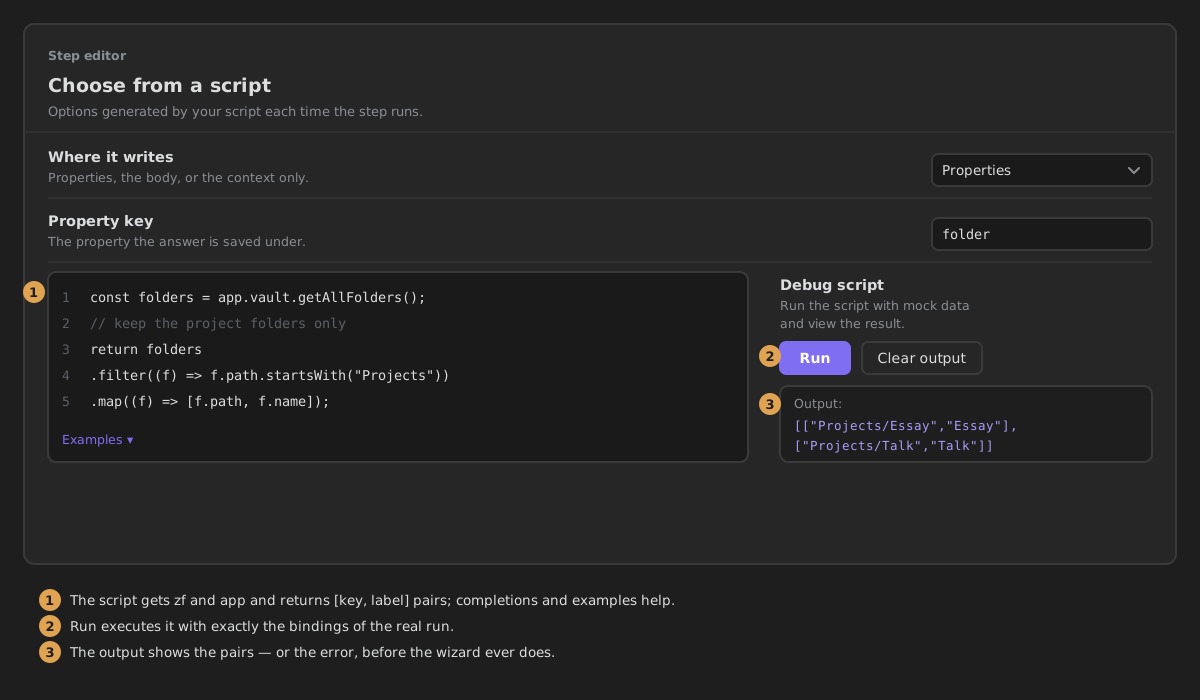
Writing the script
The script must return a list of pairs, [string, string][]: the first string is written to the note, the second is shown in the wizard.
A script that builds the list from the vault:
const folders = app.vault.getAllFolders();
return folders.map((folder) => [folder.path, folder.name]);
Available variables
| Variable | What it is |
|---|---|
zf | The ZettelFlow script API. |
app | Obsidian's own API. |
Unlike Run a script, an options script gets no note or content: it runs before you pick anything, so there is nothing to write to yet. With or without Allow several answers the script is the same, and Run executes it with exactly the variables of the real run.
The editor completes zf. and app. from the live objects, hovers show signatures, and syntax errors are flagged in the gutter.
What it writes
With Property key folder and Properties, picking Essay:
With Allow several answers on, the property is a list.